LYTE – Live YouTube Entertainment
LYTE is a tool I built to let livestream viewers request music in real-time using YouTube video IDs.
What is LYTE?
LYTE (Live YouTube Entertainment) is a livestream companion tool that lets viewers request songs by entering a simple command in chat. It’s designed to run alongside a live stream and allows dynamic music queuing from the audience — all powered through VLC.
The command system is simple and customizable. By default, viewers can type something like:
!queue dQw4w9WgXcQThis adds the specified YouTube Music video to the queue — as long as their message meets the requirements and the video hasn’t been banned by the streamer.
Why I Built It
One of my friends wanted a lightweight way to let viewers engage with his stream beyond just chat. Music is a huge part of livestreams, and letting viewers choose the vibe in real-time adds a layer of fun and interactivity that I always felt was missing. Plus, building tools like this is something I genuinely enjoy — and LYTE is one of the more ambitious utilities I’ve made to date.
Setup & Installation
LYTE is available in two versions: an executable (.exe) version for Windows, and a Python source version. Setup is fairly straightforward:
- Download the release
- Install Python (if using the source version)
- Configure your livestream and preferences
- Start the UI and let the music play!
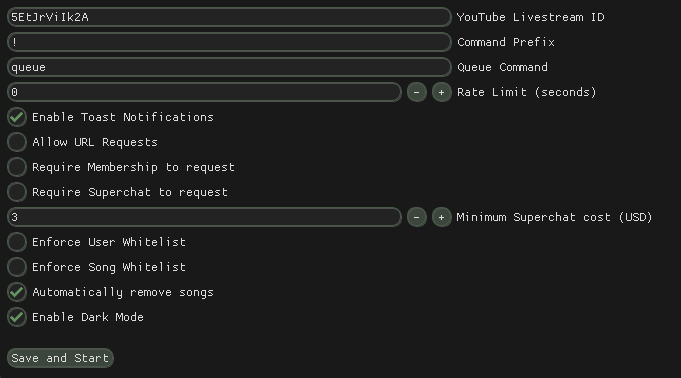
All the configuration options are explained in detail in the program's UI and documentation, and everything is designed to be beginner-friendly.
Limitations
Currently, LYTE is only fully supported on Windows. I’m aware that it doesn’t work on most Linux setups — it’s something I plan to look into eventually, but it’s not a top priority. If you manage to get it running on Linux without breaking functionality, feel free to submit a PR!
Support & Donations
If you enjoy using LYTE or find it helpful for your streams, I would truly appreciate your support. You can sponsor me on GitHub to help me continue developing open-source tools like this — and maybe even make it a full-time thing someday.
Thank you for using LYTE — and for making your streams more interactive, fun, and viewer-driven.
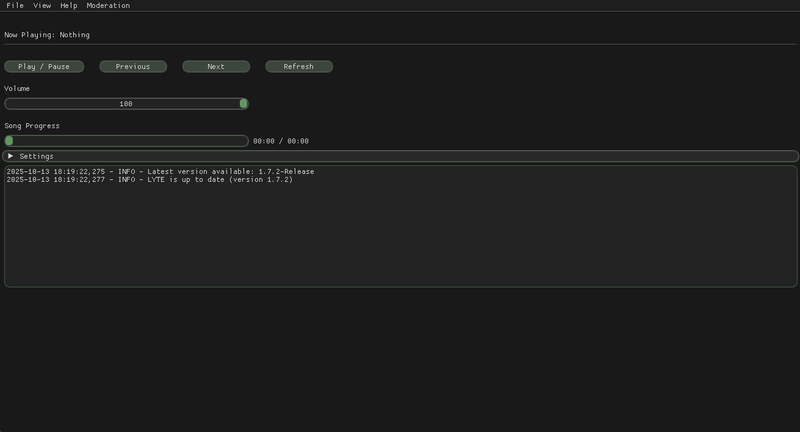
Here’s what the settings and main Control Panel UIs look like: